Sensor monitoring and management
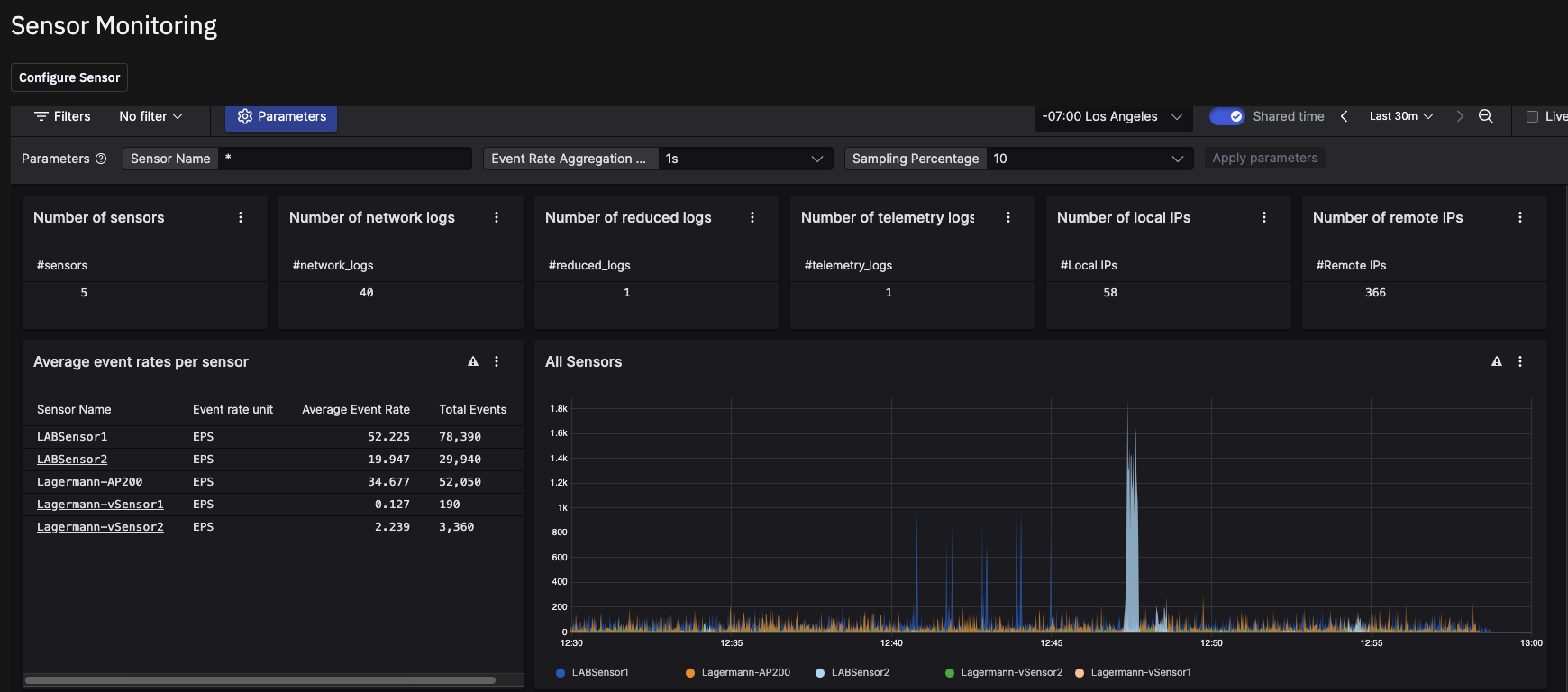
The Sensor Monitoring page provides a health dashboard for your connected sensors. Use it to monitor sensor activity, track event rates, and view the volume and type of logs your sensors are sending to Investigator.
To access Sensor Monitoring, click the Settings icon in the left navigation, click Platform Monitoring, and then select the Sensor Monitoring tab.
Parameters
At the top of the dashboard, a Parameters panel lets you filter the data displayed across all widgets:
Sensor Name — Filter to a specific sensor. Defaults to
*(all sensors).Tenant — Filter to a specific tenant. Defaults to
*(all tenants).Event Rate Aggregation Granularity — Set the time resolution for event rate calculations: 1s, 1m, or 1h.
Sampling Percentage — Set the percentage of data sampled for event rate calculations. Defaults to 10.
After adjusting any parameter, click Apply to update the dashboard.
Summary metrics
A row of six metric cards shows current counts across your environment:
Number of sensors — The total number of sensors reporting to Investigator.
Number of network logs — The count of network log entries received.
Number of reduced logs — The count of reduced-format log entries received.
Number of telemetry logs — The count of telemetry log entries received.
Number of local IPs — The number of distinct local IP addresses observed.
Number of remote IPs — The number of distinct remote IP addresses observed.
Average event rates per sensor
The Average event rates per sensor table lists each connected sensor by name and shows its event rate unit (EPS — events per second).
All Sensors chart
The All Sensors chart shows event rate activity over time for all sensors, displayed as a time-series line chart. Each sensor is represented by a separate colored line. Use this chart to identify spikes, drops, or unusual patterns in sensor activity.
Configuring sensors
If you are an admin, you can configure new sensors from this page. Click the Configure Sensor button and follow the instructions in the Quickstart topic Configure your sensors.
To remove a sensor from Investigator, turn off the export on the sensor.